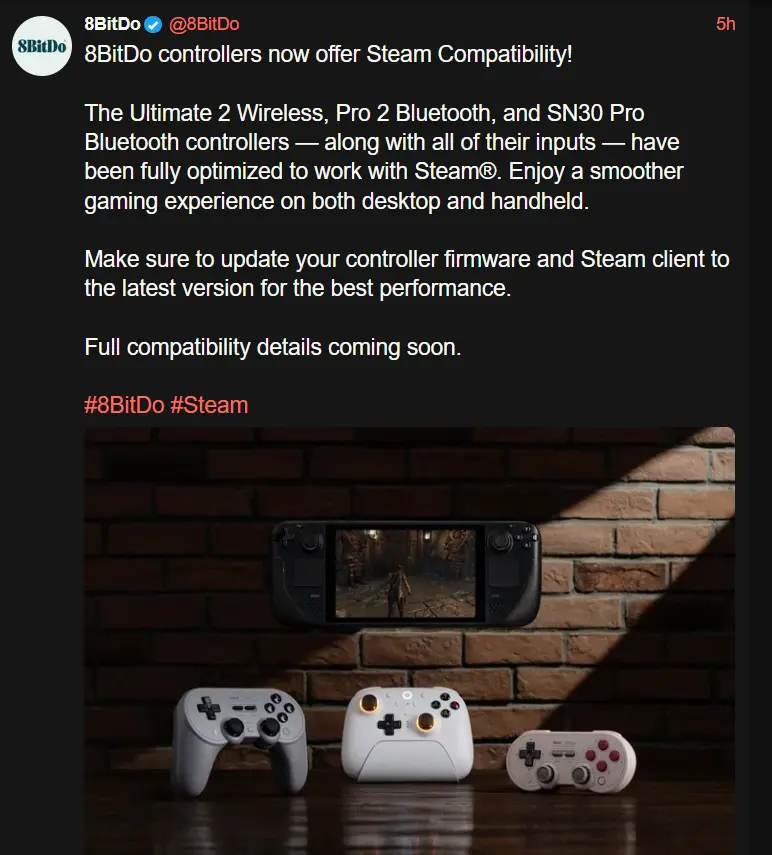
These controllers were all working on SteamOS before as far as I know, so I’m interested to see what this changes. My understanding is that previously their controllers just show up as generic xbox controllers, and now they will be properly recognized. We’ll see if this has any other benefits like custom bindings for back buttons and things like that.
Edit:
According to @[email protected]
got the 8bitdo Ultimate 2 wireless controller with the latest firmware update, and can confirm dinput mode lets me map the back buttons and extra bumpers to different inputs through Steam Input. Analog triggers and gyro work too.
I’ve been using these for years, including with my docked steam deck, and they already work great.
I also wonder what they could’ve changed.
My Ultimate 2 wireless lets me bind the extra buttons to any command as well as detect and configure the gyro controls. This is with Steam Input; so you can bind those buttons to keyboard and mouse inputs.
The back buttons didn’t work with Steam Input (and still don’t with the v1’s).
Came here to say exactly this ¯\_(ツ)_/¯
Friendly marketing reminder to those who haven’t bought one…
I love these controllers. Side note Everyone please don’t stop signing EU: https://eci.ec.europa.eu/045/public/#/screen/home UK: https://petition.parliament.uk/petitions/702074/
I really wish you could swap the buttons easily to match the system. The 8-bitdo controllers tend to have the Nintendo layout which kind of sucks because most games don’t support that they use Xbox. And then of course if you get into emulation nothing will match the PlayStation so I either need several controllers around or to memorize locations
You can! They have replacement buttons for whichever layout you want for fairly cheap. I’m using the original ultimate Bluetooth with an Xbox layout.
Wait what? Do you have a link for this?
Anybody else find a use for the back buttons? I like the idea of them but I haven’t really found a great use yet.
On the deck I use them all the time. For FPS games I frequently bind them to be ABXY, lets you jump/reload/etc without having to take your thumb off of the joystick. Absolutely mandatory for games like Doom Eternal and Deep Rock in my opinion.
In games with heavy dpad use for cycling abilities/items (like Elden Ring) I usually use them for that. Being able to cycle spells or potions while running is very necessary sometimes. You can also use them in combination with mode shift settings, things like while I hold R4 down it will temporarily turn my ABXY into a second DPAD.
You can use them for steamOS features, stuff like opening keyboard or toggling zoom for games with small text.
A lot of people dislike clicking thumbsticks, so it’s common for people to use them for that. L4 to toggle sprint instead of L3 is very popular for example. Also nice for when L3/R3 do something you don’t want to trigger accidentally during combat (Ys 8 and 9 toggle a minimap overlay with L3, which is very distracting during combat. So I’ve disabled L3 on the thumbstick and instead have L4 open the minimap overlay).
In any PC game with more inputs it can be great for common button presses that didn’t make the cut onto the standard controller. Things like map/journal shortcuts, quick save, etc. Setting left trackpad to a touch menu is also great for this.
Overall they’re pretty great, I don’t use them in every game, but there are a lot of games I refuse to play on a standard controller without them.
Maybe I need to limber up mentally, jeez! I’m so set in my ways that when I try to imagine any of this, my eyes start to glaze over. Like I’m scooping what you’re pooping but I’m startled at how much my mind is resisting.
If you don’t use them to relax your grip in specific types of games (delegating common functions to them and away from thumbs) you might like to use them for DVR capability like instant replay?
If your controller has a gyroscope, you may use them to toggle engagement? Gyro aim can be surprisingly effective once you’re accustomed to it.
I like that idea about gyro aim engagement. I think the only place I’d use that is BotW, but I’d like to go back to that game someday.
Ah, I’m not sure how well that’d work via yuzu and ryujinx forks. Perhaps if the executable is added through the steam client so you could delegate the functionality via steam input? Sounds messy as heck though.
I just map it to the abxy that steam suggests. Works great when I wanna keep using the trackpad or joystick at all times.
Back buttons are essential in any competitive action game.
I don’t do competitive stuff other than couch multi, but it sounds intense.
I just got their ultimate 2 wireless today. It’s really nice and works very well on Linux. I just wish their app worked at least through wine. I couldn’t even make it work in a Windows VM. Hope they bring it over.
Having the same issue and I don’t know how to update to the latest firmware without the app.
That’s cool to see but I’ve gone through about 3 8bitdo controllers (gave the last one to my partner). I like them but I wish there triggers were not the rubber magnetic pads. I’m a bit heavy handed when using the triggers and it eventually crushes the pads to not work. Other than that great controller.
Upside, usually the controllers are extremely easy to fix. I’m not sure if they give free replacement pads still, but they used to if you asked support.
I’ve had other problems than shoulders on my pros, and never with the ultimate one I got, those seem to have a pretty solid build.
I took apart the first one and had to order the pads. They were cheap and available. I sent the second one back to be replaced because disconnecting the board from the controls stripped the connection. It was easy and had it back fast.
How have I never seen these before? When my ps4 controller dies I know what I’m getting next now